-
Search Results
-
I’ve been working with my existing XBox 360 controllers and the PC USB Adapter on my RetroPie. I’ve read some people say that the lag they have makes them unusable for faster games. I can’t necessarily say that they lag, but when playing games like Mario Bros, there are some times where certain button presses might be lagging enough to be annoying and make things not go as they should.
Assuming my ‘issues’ are due to lag and not the fact that I’m a ‘bit’ older than I was when I last played on the actual NES system, how do the XBox One controllers compare with RetroPie relative to the 360 controllers? Is the lag I’ve read about (and may be experiencing to a degree) something in the controller itself, or is it in the driver implementation? Does anyone have any firsthand experience with both on the RetroPie?
Worst case maybe I should order a Control Block and figure out the best way to wire up the actual NES, SNES and N64 controllers to the RetroPie.
Hi everyone ,
This is my first post here but I have been uusing retropie on my raspberry pi for awhile ( more than a year actually ) . Recently I built a arcade cabinet with 4 controllers : 2 retrolink n64 joypads + a beautiful Xarcade 2 joysticks. But the reason I’m writing this is because I’m having a hard time to use them properly. When playing n64 games for an unknown reason only my n64 controllers are detected ( which is actually fine ) but when launching lets say mame or snes and nes roms , it is using my n64 joypads once again and not my Xarcade. I would have to unplug the n64 joypads to use the Xarcade OR mess with the retroarch config file ( per emulator / roms )
Now , the neat feature that I think would be useful for everyone like me that is bulding a arcade cabinet, is to access the same menu to choose the emulator ( the “X” menu to choose emulator , video plugin ) . In that menu we could choose for “X” emulator player 1 = Xarcade player 2 = Xarcade and Voila ! It wouldnt take so long and it would possible to do it on the go.
I hope people will like this idea and it would helps a lot ! Thanks a lot
Have fun
– Raoskidoo
Hey Guys.
I bought a retropie HD setup for my wife for xmas so she can play all the games she used to when she was a kid. The link below shows which unit it was.I have managed to get most things working as the majority was set up by the seller. The wireless PS3 controllers work. I connected the unit via wireless dongle to add games etc. I had a wireless microsoft keyboard that I connected and works fine. But there are some things I can’t work out and have no idea where to start.
1: Can’t get any C64 game to work. I realised I needed the keyboard to get in to a few games once they loaded, but no controls work. Not the PS3 controller, or any of the keyboard keys. Do I have to buy an old C64 controller with a usb adapter for it to work??
2: The graphics seem wayyy tooo pixelated in emulators such as master system and mega drive. I am using it on a LG 60inch plasma tv. I know the bigger the tv the more grainy it can look. But is there a way of lowering the display settings in the unit or TV?? Or is there a setting to make it just a little more crisp??
3: I can’t seem to get any MAME game to work. Everything I have downloaded and copied in to the mame-mame4all rom folder (in WinRar Zip files), they show up on the main mame emulator menu to play, but none of them do. What I am I doing wrong???
Sorry if I have asked too many questions in a thread. But this is really frustrating me… and it was easier to post all my problems rather than trying to work out where the right place for each question would be.
This is really doing my head in :-(
Any help would be appreciated guys.
I have an odd glitch, and have no idea how to fix it…
I’ve (finally) got a N64 controller working via a Mayflash USB adaptor. But – it works fine in Emulation Station, then is unresponsive when launching a game. However, it can be brought back to life by physically disconnecting & reconnecting it to it’s USB port after a game is started.
This seems to happen for all emulators.
Any ideas why this might be happening? It’s most annoying having to do the unplug / plug routine after launching every game.
N64: (1) No matter how hard I try, I can’t seem to get the right settings to open the RGUI in game to set the controls using this. I have it so I can close the game using the hotkey, but I’m not sure what I am missing/need to be able to open this. The controls are slightly off after ES default config and I would like to fix it using that like all the others. Pretty much resolved, needed to edit both the mupen64plus.cfg and InputAutoCfg.ini files together to fix controller issues, no luck on RGUI to open, but this works for now
(2) Also, I will file this under the N64 header only because that’s where the issue arises. I only have two controllers plugged in at most, but the “Configure Input” in ES says there are three gamepads detected. Most likely due to the USB keyboard I have hooked up from time to time. Even when only one controller is hooked up though, it says there are three detected. The issue comes up when trying to play Star Fox 64. It auto detects how many controllers are hooked up and sets that as the amount of players playing. How do I disconnect the third controller, or at least disable it if it isn’t plugged in? Resolved. Issue was my keyboard was considered a “plugged in controller” since n64 auto detects those. Once I set it so it was false for “plugged in”, this was resolved.
Dreamcast/Reicast: (1) I also can’t get the RGUI to pop up for this one, but I’m pretty sure it’s because I haven’t put it in the config file, not sure what needs to go in there. But there was an earlier post on here that helped me get it so my controls worked for the dreamcast, using the HEX value for the buttons, however, the exit button that’s default should be select. I tried the 0x13a and 0x137, both do not work for me. In fact, it seems that a lot of my controls don’t work. Resolved. Source based installation of reicast, retyped in the hex values with select/quit being 0x13a and it works now.
I am still fairly new to all this, so, I apologize if this is simple stuff. I have searched and tried A LOT of stuff and none of it has worked thus far. I can post whatever is needed, but I’m also not sure the best way to do that besides copy and paste…
Thanks in advance for any assistance.
Topic: N64 Mario Kart sound issue
Hello,
Mario Kart runs very nicely on the Pi2 apart from the sound which seems to stutter quite often, is this normal? Just wondered if anyone can recommend any tweaks?
Thanks
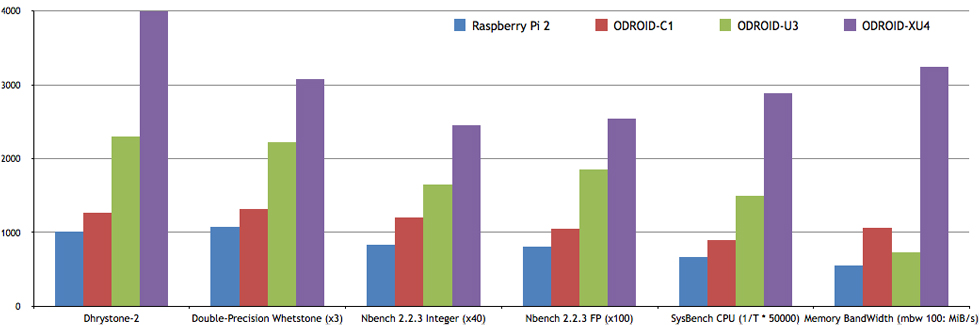
I don’t know how much using different hardware affects the performance of an OS, but I did some research into mini-computers with higher processing capability than that of the Raspberry Pi 2 and found out about the ODroid C1, U3, and XU4. I’m 100% sure these pieces of hardware are more capable than the Raspberry Pi 2 in running the new “out-of-experimental” emulators such as Mupen64Plus, ppsspp, and reicast. Somewhere popular on this site, I think recommendations for these pieces of hardware should be advertised for people that want in on this operating system- but with no limitations. I’m pretty sure the Odroid XU4 is the best right now. I’m gonna buy an XU4 myself later and I’ll tell you guys how it is.
Here are some references to convince you guys:
Hi there,
I’m having serious issues when configuring a second joystick for Snes and using my BUFFALO joysticks
I have, in total, 3 pairs of different joysticks
2 original N64 joysticks connected throught a Mayflash N64 to USB adapter
2 iBuffalo Snes joystick
2 BUFFALO BSGP1601Pi Model: 2 b+
RetroPie Version Used: 3.3 (Fresh installed)
Built From: SD Image
USB Devices connected:
Aside from the aforementioned joysticks, I have a keyboard, a mouse and a WiFi adapter. Everything is connected throught an active USB hubWhen using the Snes/NES emulator, I can configure only snes joystick without any issues. However, when I try to configure the other one, the emulator won’t detect I’m pressing any buttom. I tried changing the joystick but only detects one kind of joystick at a time (I’d have to use a Snes controller for player 1 and a N64 for Player 2)
The funny part is I get the “not configured” yellow message for Snes controllers and the N64 controllers when the Snes emulator starts (it doesn’t matter which one). But for the BUFFALO ones, I get the “Connected in port #4 and #5” and yet, it won’t let me choose them within the settings.
I’ve also tried mapping the snes.cfg manually and I ended up controlling both players (1 and 2) with my player 1 joystick eventhough I set the input_device_p2 and input_player2_joypad_index to the result from the jstest command.
So, long story short
1) How can I configure a second matching joystick?
2) Why I can’t use my BUFFALO controllers and how would I fix it?If you were kind enough to read this, let me thank you for your time.
Thanks
JanusI wanna be excited about playing these consoles, but I’m at the point where I’m convinced the Raspberry Pi 2 isn’t good enough. I love the simplicity and freedom of the Retropie operating system, but let’s be honest: if we wanna be playing these new emulators as the production of Retropie advances, we’re gonna need other (more preferable) hardware options to run these new “out of experimental” consoles. Can the dev team provide recommendations for other hardware that’ll play the consoles without hitches? Thanks!
Topic: N64 Controller Issues
What would cause an n64 controller to work for some roms and not others?
Using a HuiJia USB GamePad for N64 controller. It works great for some roms, works until a certain point in the start menu for some and does not work at all on others.
I have only tried for n64 roms, nothing else. Using different emulators as well depending on the rom and the output.
Thanks
Topic: SNES, PSX/2 Analog Opinions
Essentially my case is almost done, with the exception of a dual USB extension from China and any other odds and ends I decide to add to it, but, I want a more authentic feeling experience when playing these older games, more in particular for the SNES and PSX experience…since N64 is mostly iffy to play. I have looked at both options as far as the SNES goes and have seen plenty of bad reviews that say either some buttons don’t work for USB controls, won’t pick up some buttons for adapters, and the plain just won’t work for anything outside of PC, I have yet to look into analog PSX/2 control options. I know I could easily just stick with my PS3 control for PSX, but having the connector at the other end and not abusing that control would be nicer.
Essentially, I would like to know what USB setups you all have used that have either worked with little to no added pain to get to work properly. I am also using a powered hub in my case to alleviate the strain of 4 ports on the Pi and power consumption.
Hello, I am new to RetroPie and I am still learning about it. I have an Xbox controller (original). If I buy an adapter like this one will it work? I am asking this because I don’t want to spend 10 bucks for nothing and I only saw tutorials on the Xbox360, N64 and PS3 controllers in the wiki. Thanks.
So i just setup my rpi2 with the newest version of retropie(3.2.1). it asked me to setup the buttons when it first came up so i did that(using rock candy xbox 360 controllers). So i load up mariokart 64 and the controls make no sense and i cant figure out how to change them. Drive forward is the “A” button on the xbox controller which is fine, but to shoot your items is “riht analog stick down” which is very odd. I tried to modify the Mupen64plus InputAutoCfg file to setup the buttons the way i want(under each instance of the xbox controller i could find), but it didnt seem to do anything. any ideas on how i can map the buttons the way i want?
I’ve got a retropie setup for the kiddos as a present for Yule. The N64 emulation works great and the controller (a Logitech F310) also workings great —- but ONLY in the N64 emulator. NES and SNES don’t work at all, even though I can use the controller to navigate the menu system. I can play the games in SNES and NES emulation with the keyboard, but not the F310.
I have tried to use the shoulder trick to no avail. I also tried installing the xbox controller drivers, but that made the problem worse.
Any ideas of what to do next?
Topic: Error Flash Screen
Hello
I m very new in retropie workflow, i ve downloaded the last img for raspberry and try to start EmulationStation.
Yesterday i had an error about Alsa and the splashscreen EmulationStation flashing.
So after a little of google i ve found a solution to configure the /boot/config.txt in the idea than the Alsa error message crashed the emulatorstation.Now i do not have errors messages but always the splashscreen flashing and blocked on it.
The log do not seems to show any problems so i m confuse about how to resolve this bug.
the rapsberry is RASPBERRY PI 2 MODEL BAny help would be appreciate ;)
This the es_log.txt and boot/config.txt files.this the log:
pi@raspberrypi ~ $ emulationstation --debug
lvl2: 	EmulationStation - v2.0.1a, built Oct  4 2015 - 21:44:17
lvl2: 	Creating surface...
lvl2: 	Created window successfully.
lvl2: 	Checking available OpenGL extensions...
lvl2: 	 ARB_texture_non_power_of_two: MISSING
lvl2: 	Loading system config file /etc/emulationstation/es_systems.cfg...
lvl2: 	Parsing XML file "/home/pi/.emulationstation/gamelists/amiga/gamelist.xml"...
lvl2: 	Parsing XML file "/home/pi/.emulationstation/gamelists/amstradcpc/gamelist.xml"...
lvl1: 	System "amstradcpc" has no games! Ignoring it.
lvl2: 	Parsing XML file "/home/pi/.emulationstation/gamelists/apple2/gamelist.xml"...
lvl2: 	Parsing XML file "/home/pi/.emulationstation/gamelists/atari2600/gamelist.xml"...
lvl1: 	System "atari2600" has no games! Ignoring it.
lvl2: 	Parsing XML file "/home/pi/.emulationstation/gamelists/atari5200/gamelist.xml"...
lvl1: 	System "atari5200" has no games! Ignoring it.
lvl2: 	Parsing XML file "/home/pi/.emulationstation/gamelists/atari7800/gamelist.xml"...
lvl1: 	System "atari7800" has no games! Ignoring it.
lvl2: 	Parsing XML file "/home/pi/.emulationstation/gamelists/atari800/gamelist.xml"...
lvl1: 	System "atari800" has no games! Ignoring it.
lvl2: 	Parsing XML file "/home/pi/.emulationstation/gamelists/atarilynx/gamelist.xml"...
lvl1: 	System "atarilynx" has no games! Ignoring it.
lvl2: 	Parsing XML file "/home/pi/.emulationstation/gamelists/atarist/gamelist.xml"...
lvl1: 	System "atarist" has no games! Ignoring it.
lvl2: 	Parsing XML file "/home/pi/.emulationstation/gamelists/c64/gamelist.xml"...
lvl1: 	System "c64" has no games! Ignoring it.
lvl1: 	  Unknown platform for system "coco" (platform "coco" from list "coco")
lvl2: 	Parsing XML file "/home/pi/.emulationstation/gamelists/coco/gamelist.xml"...
lvl1: 	System "coco" has no games! Ignoring it.
lvl1: 	  Unknown platform for system "dragon32" (platform "dragon32" from list "dragon32")
lvl2: 	Parsing XML file "/home/pi/.emulationstation/gamelists/dragon32/gamelist.xml"...
lvl1: 	System "dragon32" has no games! Ignoring it.
lvl2: 	Parsing XML file "/home/pi/.emulationstation/gamelists/fba/gamelist.xml"...
lvl1: 	System "fba" has no games! Ignoring it.
lvl1: 	  Unknown platform for system "fds" (platform "fds" from list "fds")
lvl2: 	Parsing XML file "/home/pi/.emulationstation/gamelists/fds/gamelist.xml"...
lvl1: 	System "fds" has no games! Ignoring it.
lvl2: 	Parsing XML file "/home/pi/.emulationstation/gamelists/gamegear/gamelist.xml"...
lvl1: 	System "gamegear" has no games! Ignoring it.
lvl2: 	Parsing XML file "/home/pi/.emulationstation/gamelists/gb/gamelist.xml"...
lvl1: 	System "gb" has no games! Ignoring it.
lvl2: 	Parsing XML file "/home/pi/.emulationstation/gamelists/gba/gamelist.xml"...
lvl1: 	System "gba" has no games! Ignoring it.
lvl2: 	Parsing XML file "/home/pi/.emulationstation/gamelists/gbc/gamelist.xml"...
lvl1: 	System "gbc" has no games! Ignoring it.
lvl2: 	Parsing XML file "/home/pi/.emulationstation/gamelists/intellivision/gamelist.xml"...
lvl1: 	System "intellivision" has no games! Ignoring it.
lvl2: 	Parsing XML file "/home/pi/.emulationstation/gamelists/macintosh/gamelist.xml"...
lvl2: 	Parsing XML file "/home/pi/.emulationstation/gamelists/mame-advmame/gamelist.xml"...
lvl1: 	System "mame-advmame" has no games! Ignoring it.
lvl2: 	Parsing XML file "/home/pi/.emulationstation/gamelists/mame-libretro/gamelist.xml"...
lvl1: 	System "mame-libretro" has no games! Ignoring it.
lvl2: 	Parsing XML file "/home/pi/.emulationstation/gamelists/mame-mame4all/gamelist.xml"...
lvl1: 	System "mame-mame4all" has no games! Ignoring it.
lvl2: 	Parsing XML file "/home/pi/.emulationstation/gamelists/mastersystem/gamelist.xml"...
lvl1: 	System "mastersystem" has no games! Ignoring it.
lvl2: 	Parsing XML file "/home/pi/.emulationstation/gamelists/megadrive/gamelist.xml"...
lvl1: 	System "megadrive" has no games! Ignoring it.
lvl2: 	Parsing XML file "/home/pi/.emulationstation/gamelists/msx/gamelist.xml"...
lvl1: 	System "msx" has no games! Ignoring it.
lvl2: 	Parsing XML file "/home/pi/.emulationstation/gamelists/n64/gamelist.xml"...
lvl1: 	System "n64" has no games! Ignoring it.
lvl2: 	Parsing XML file "/home/pi/.emulationstation/gamelists/neogeo/gamelist.xml"...
lvl1: 	System "neogeo" has no games! Ignoring it.
lvl2: 	Parsing XML file "/home/pi/.emulationstation/gamelists/nes/gamelist.xml"...
lvl1: 	System "nes" has no games! Ignoring it.
lvl2: 	Parsing XML file "/home/pi/.emulationstation/gamelists/ngp/gamelist.xml"...
lvl1: 	System "ngp" has no games! Ignoring it.
lvl2: 	Parsing XML file "/home/pi/.emulationstation/gamelists/pc/gamelist.xml"...
lvl2: 	Parsing XML file "/home/pi/.emulationstation/gamelists/pcengine/gamelist.xml"...
lvl1: 	System "pcengine" has no games! Ignoring it.
lvl2: 	Parsing XML file "/home/pi/.emulationstation/gamelists/ports/gamelist.xml"...
lvl2: 	Parsing XML file "/home/pi/.emulationstation/gamelists/psx/gamelist.xml"...
lvl1: 	System "psx" has no games! Ignoring it.
lvl2: 	Parsing XML file "/home/pi/.emulationstation/gamelists/retropie/gamelist.xml"...
lvl1: 	  Unknown platform for system "scummvm" (platform "scummvm" from list "scummvm")
lvl2: 	Parsing XML file "/home/pi/.emulationstation/gamelists/scummvm/gamelist.xml"...
lvl2: 	Parsing XML file "/home/pi/.emulationstation/gamelists/sega32x/gamelist.xml"...
lvl1: 	System "sega32x" has no games! Ignoring it.
lvl2: 	Parsing XML file "/home/pi/.emulationstation/gamelists/segacd/gamelist.xml"...
lvl1: 	System "segacd" has no games! Ignoring it.
lvl1: 	  Unknown platform for system "sg-1000" (platform "sg-1000" from list "sg-1000")
lvl2: 	Parsing XML file "/home/pi/.emulationstation/gamelists/sg-1000/gamelist.xml"...
lvl1: 	System "sg-1000" has no games! Ignoring it.
lvl2: 	Parsing XML file "/home/pi/.emulationstation/gamelists/snes/gamelist.xml"...
lvl1: 	  Unknown platform for system "vectrex" (platform "vectrex" from list "vectrex")
lvl2: 	Parsing XML file "/home/pi/.emulationstation/gamelists/vectrex/gamelist.xml"...
lvl1: 	System "vectrex" has no games! Ignoring it.
lvl1: 	  Unknown platform for system "videopac" (platform "videopac" from list "videopac")
lvl2: 	Parsing XML file "/home/pi/.emulationstation/gamelists/videopac/gamelist.xml"...
lvl1: 	System "videopac" has no games! Ignoring it.
lvl2: 	Parsing XML file "/home/pi/.emulationstation/gamelists/wonderswan/gamelist.xml"...
lvl1: 	System "wonderswan" has no games! Ignoring it.
lvl1: 	  Unknown platform for system "zmachine" (platform "zmachine" from list "zmachine")
lvl2: 	Parsing XML file "/home/pi/.emulationstation/gamelists/zmachine/gamelist.xml"...
lvl2: 	Parsing XML file "/home/pi/.emulationstation/gamelists/zxspectrum/gamelist.xml"...
lvl1: 	System "zxspectrum" has no games! Ignoring it.
^Clvl2: 	EmulationStation cleanly shutting down.
EmulationStation will restart in 5 seconds. Press a key to exit back to console.
And my /boot/config.txt:
# For more options and information see
# http://www.raspberrypi.org/documentation/configuration/config-txt.md
# Some settings may impact device functionality. See link above for details

# uncomment if you get no picture on HDMI for a default "safe" mode
#hdmi_safe=1

# uncomment this if your display has a black border of unused pixels visible
# and your display can output without overscan
disable_overscan=1

# uncomment the following to adjust overscan. Use positive numbers if console
# goes off screen, and negative if there is too much border
overscan_left=16
overscan_right=16
overscan_top=16
overscan_bottom=16

# uncomment to force a console size. By default it will be display's size minus
# overscan.
#framebuffer_width=1920
#framebuffer_height=1080

# uncomment if hdmi display is not detected and composite is being output
#hdmi_force_hotplug=1

# uncomment to force a specific HDMI mode (this will force VGA)
hdmi_group=1
hdmi_mode=82

# uncomment to force a HDMI mode rather than DVI. This can make audio work in
# DMT (computer monitor) modes
hdmi_drive=2

# uncomment to increase signal to HDMI, if you have interference, blanking, or
# no display
config_hdmi_boost=4

# uncomment for composite PAL
#sdtv_mode=2

#uncomment to overclock the arm. 700 MHz is the default.
#arm_freq=800

# Uncomment some or all of these to enable the optional hardware interfaces
#dtparam=i2c_arm=on
#dtparam=i2s=on
#dtparam=spi=on

# Uncomment this to enable the lirc-rpi module
#dtoverlay=lirc-rpi

# Additional overlays and parameters are documented /boot/overlays/README
#gpu_mem = 32
dtparam=audio=on