Anonymous
Inactive
Which version of the pi are you using? I’d be more curious to know a list of roms that work on the RPi 2 and not the 1. There is already a list (somewhere) of N64 roms and how well they work on Mugen (cannot recall offhand whether it is Pi specific although I think it might be).
I haven’t had chance to properly check but Diddy Kong Racing on the pi 2 at least boots up to the character screen. I didn’t go further than that as I didn’t have time.
EDIT:
Found it; following are for pi 1.
See http://www.raspberrypi.org/forums/viewtopic.php?t=58395
And https://code.google.com/p/mupen64plus/wiki/GameCompatibility
First, thanks for retropie, it’s friggin’ fantastic!
I’ve got retropie up and running with the majority of the emulators working. I’ve got a ton of N64 roms loaded onto my SD card, but have noticed that only a handful really work. That’s to be expected I suppose, since N64 emulation is really pushing the envelope of what the PI can do. So I’m curious if anyone has a list of N64 roms that work pretty well on the PI.
So far, I’ve only really found 2:
Mario Cart 64
Super Mario 64
What other N64 roms have you found that work well?
Hello,
Thanks for the great work so far. Everything is running quite smoothly at the moment but I have two question:
- What settings should be used for the memory split?
- I can exit every emulator with a combination of “Select” and “Start” on my controller. Only for the N64 games I have to use the keyboard and press “ESC”. It would be really cool to exit N64 games also via gamepad, because then I can completely remove the keyboard from the raspberry. Is this possible?
AnonymousInactive
I’ve also just got my Rpi2 and used Buzz initial image on page 2 as I saw some people had some issues with the latest and wanted to test it first. Only tried a few things so far and have not overclocked but appears to run OK. Going to try further tonight and see if the N64 and PS1 emulators work. Cheers for the images Buzz makes life much much easier.
New version is working well for me.
Using only default settings:
Working emulators:
Not working:
I still get random crashes though. I’ve only had two so far since installing the latest image, but it makes me nervous. Think my unit is faulty, or should I try a different SD card?
AnonymousInactive
Im trying to find where i can change things like resolution or ForceTextureFilter or show FPS for the N64 emulation, all my roms are stored in /home/pi/RetroPie/roms/N64
Latest source compile mupen64plus emulator black screen with audio, Through latest retropie-setup.
i’ve tryed the last pi2 image from googledrive.
with this image no n64 games will work for me, the emu crashes with a sound error message.
the problem exist with both n64 emus.
with the imageversion before there is no crash.
AnonymousInactive
Thanks. the emulator runs really well on the new rpi
My only issue is with controller mapping. I have two generic N64 USB controllers. Unfortunately the mapping of the keys is wrong. A and B map to the right hand down and left. and A&B map to the shoulder buttons. I cant quite figure out where this info is stored, and i’ve tried to set it up using retroarch but assume that mupen doesnt use retroarch because the mapping has no effect.
Can anyone help me with this??
There are two n64 emulators. Each has an own rom dir (n64 and n64-mupen64plus). Both have the video plugins video-n64 and video-rice. Some games run better with the rice plugin, some run better with the n64 plugin. If you use mupen64plus-libretro press F1 and go to core settings. There you can change the default video plugin (needs restart). The default video plugin of mupen64plus can be changed under /opt/retropie/configs/n64/mupen64plus.cfg.
Hi !
Though I’d share my experience with the RPI 2.
First I’m a total newbie to raspberrys and linux, in fact I just heard about the RPI 2 when it came out and was very interested in it then learned about Retropie. and I came up with a project of building a retro arcade cofee table.
I installed retropie from raspbian using the retropie script, it works great !
Every emulator works but some roms won’t dont know why yet.
For example Super Mario works fine on N64, but I can’t get Mario Kart to work (I can watch the intro but can’t play).
Or some roms still have audio issues, even after updating the N64 emulator from source on the retropie setup.
The best working emulator after my tests was the PSX, I tried many roms, most of them worked fine at normal speed without any image or audio bugs. I was pretty surprised seeing that coming out of the RPI 2
and mupen64plus (from source as I can’t update binaries currently due to the retropie site move)
you may want to update mupen64-libretro (from binary or source – if from source update retropie-setup first) as that has been updated since the image was made.
not sure exactly as still checking/going through. Possibly jzintv. mupen64plus has some optimisations, but may be able to use an additional change or so. there may be others too.
AnonymousInactive
Its primarily for SNES and NES, but if I could run N64/PS1, that would be great too.
Addiotionally I would also like to be able to convert it to a mediaplayer.
It seems my file is either corrupt or the wrong one, could someone please send me libmupen64plus.so.2 located in /opt/retropie/emulators/test/mupen64plus-rpi/test?
Hi, I’ve just installed RetroPie but I’m having a few issues with these two.
I’ve copied games to the PSX folder (.cue/.bin) and copied over SCPH1001 & the 7501 (Not entirely sure if that’s the correct name/number) to the home directory BIOS folder and the folder in which the emulator is run from, but the PSX isn’t showing on the RetroPie screen, I can see all of the other emulators except this one.
I’ve also copied over games to the N64 in .n64 format I can see the games and run them but I get an error about a file named libmupen64plus.so.2 having an invalid ELF Header, is there any fix to this or could someone provide me with the two libmupen64 files?
Thanks for reading!
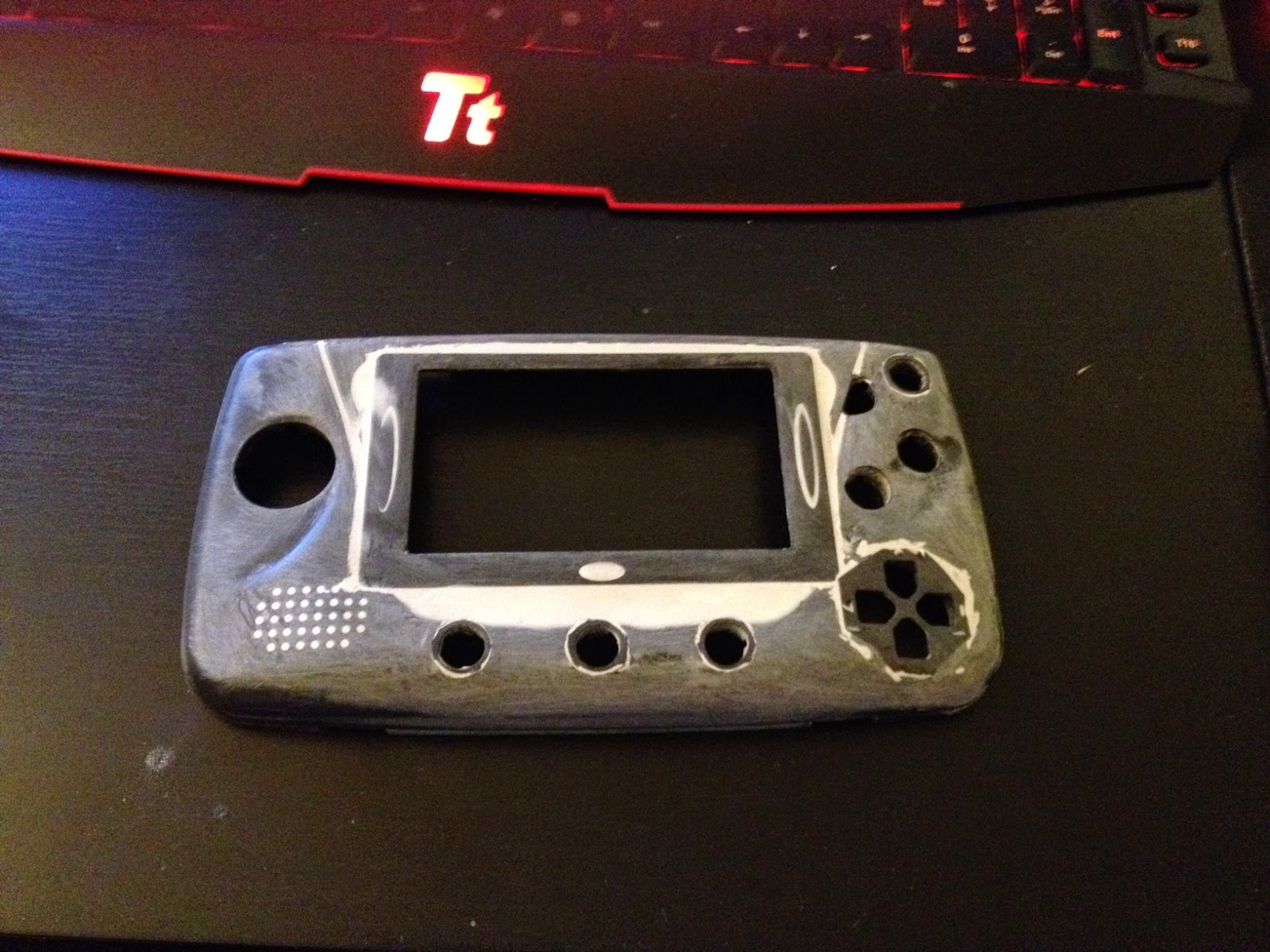
Thought I would share a picture of the progress I made last night. Finished adding buttons to the front of the shell. The goal for this weekend is to get the front finished and painted, then wire up all the buttons and screen. The D-Pad on the bottom right is more for C style buttons on N64 than directional buttons.

Seems to crash most often when an emulator is closed. Here’s a crash after exiting Retroarch after playing Doom:
Edit: Yep, that seems to be the issue. Crashed after using the RetroArch N64 emulator too (which was a little choppy at first but then sped up to perfect speed ^_^)
I’ve been playing around with the image Buzz uploaded on page 2.
I’ve configured a 254/746 memory split.
N64 games actually work and tested games have been smooth.
PSX video is 100%, audio still a bit choppy. I’m expecting this to be flawless with a slight overclock or adjustment to memory distribution.
GBA games crash and lock up if they have modded intros (where the ROM dumper added their own intro screen). Crashy behaviour elsewhere in this emulator too.
I’m getting random crashes here and there, unfortunately. Is anyone else experiencing this? I hate having to hard reboot the Pi2, as that’s a recipe for a corrupted microSD card.
AnonymousInactive
One note from my previous post I forgot to mention. When you use “raspi-config” to extend the root on the SD also change the overclock to the Pi2 setting 1000 – this fixed choppy sound in N64; before that with the default setting sound in Mario64 was choppy.
AnonymousInactive
I got my Pi2 a few days back. Got a chance last night to backup my roms and hori controller configs from the B+ in preparation for a wipe and install of Buzz’s image (https://drive.google.com/file/d/0B_knGioK16E6c0d4MDZCRUlqclU/view?usp=sharing).
So, first things first.. Thanks Buzz, the image works like a charm! the Pi2 boots much faster than my old B+ and plays ALL the roms I’ve tested.
Now, the games..
Metal Slug’s – I love them and use the FBA emulator to play them. Prior the B+ 2 to 5 exhibited some slowdown/choppy sound in certain parts of the games – NO longer with Pi2 the games are smooth and play extremely well with the arcade stick!! I’m really impressed and this alone justified the purchase :)
N64 – Could never get a rom to load on the old B+; roms load and play fine (tested Mario64 & some snowboarding game)
SNES – Tested yoshi’s island and starfox as neither of these were really playable on the B+; now they are! they work flawlessly. Starfox still has the original slowdown that I experienced on the console as a kid but that was expected.
MAME – Tested a few roms and found they were faster to load, and felt smoother without sound issues (had sound issues with TMNT in Time & Simpsons before)
All in all worth the upgrade and switching from B+ to Pi2 was very easy.
Releases in sweden in some weeks.. Getting one next month! Can’t wait to see it run N64 ;p
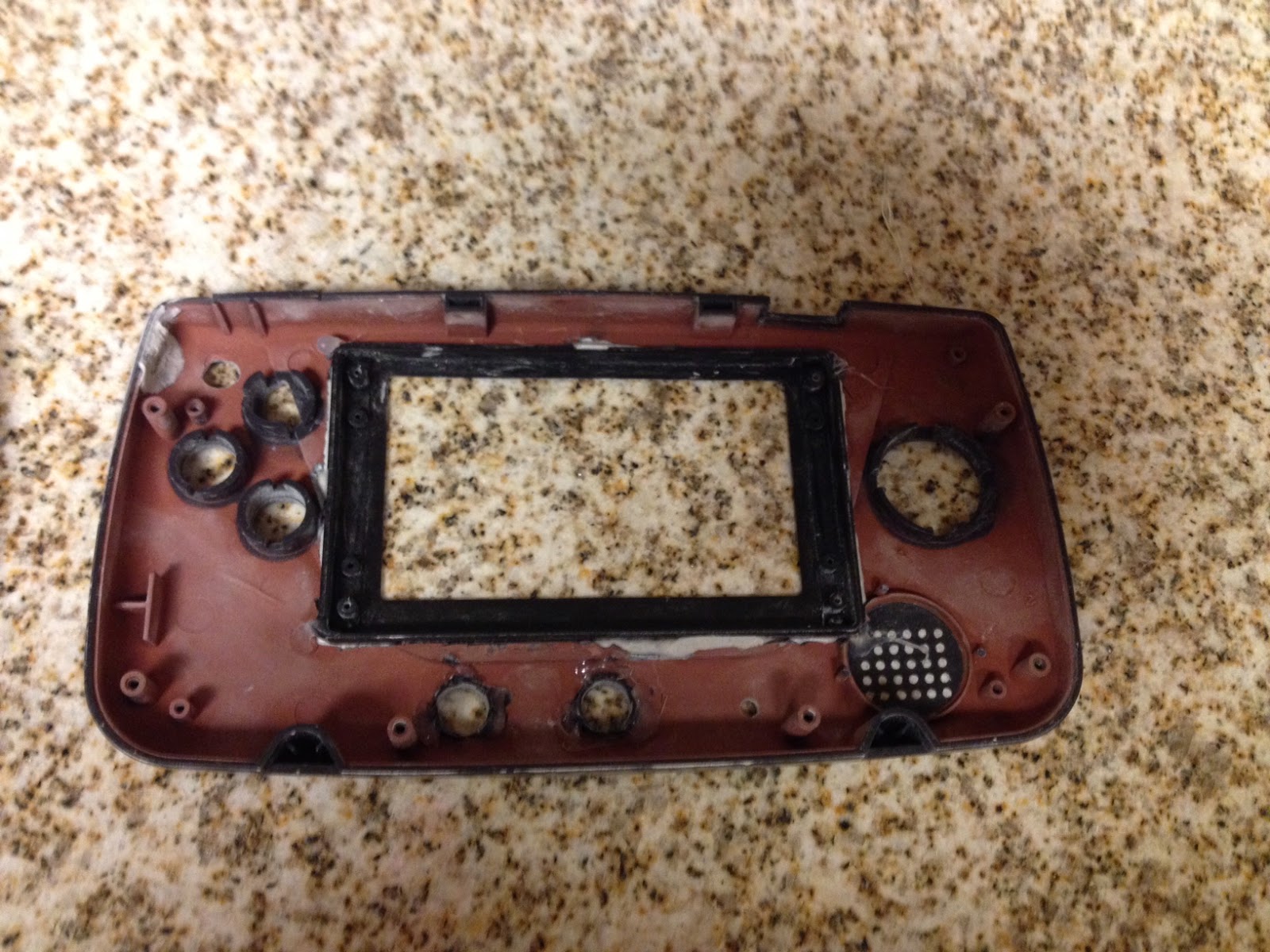
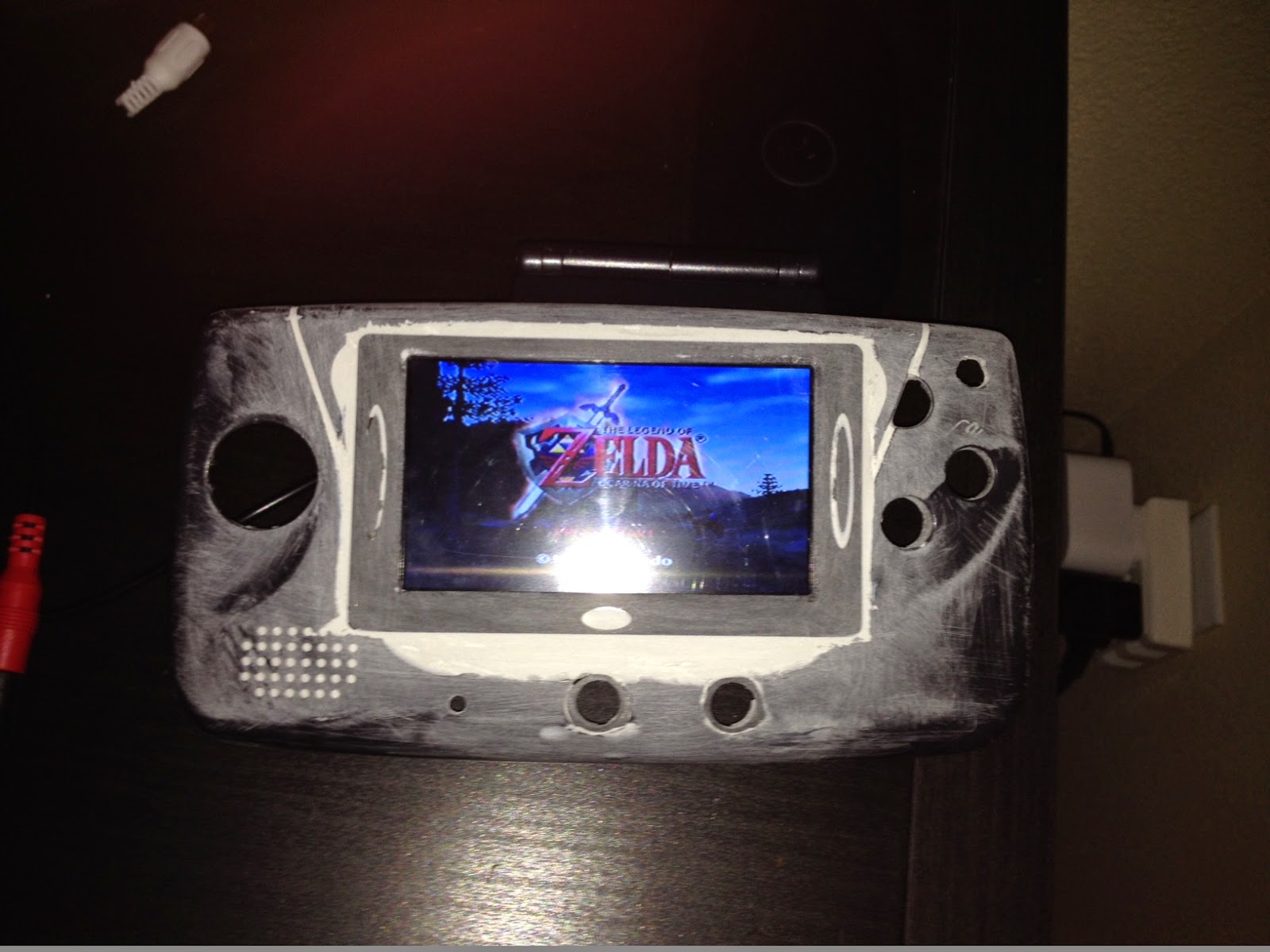
Thought I would share a recent project I started working on. I had a broken game gear lying around and realized it would be perfect for a handheld raspberry pi. So far I have started gutting the console and filling in the holes with plastic filler. I have a 4.3″ car LCD that will be going in it. Last night I was able configure it to run off of 5v (instead of the 12v that it comes set up for). There will also be several buttons added from cheap USB controller and push pin buttons, these will be hooked up to the GPIO pins and then coded to simulate keyboard key presses. Originally I was going to put a model A board in there but after the Raspberry model 2 was released I ordered on and will end up using that once it arrives.
Things left to do:
-Finish cutting out holes for / adding all of the buttons
-Finish filling and sanding, then paint
-Wire up the buttons and LCD to 26 pin header I made from some pins and proto board
-Wire in Audio amp (with volume control) and some speakers. Along with headphone jack.
-Add rechargable battery to power the Pi and screen. Using this: [url]http://www.ebay.com/itm/380777493751?_trksid=p2057872.m2749.l2649&ssPageName=STRK%3AMEBIDX%3AIT[/url]
-Wire up power switch, going to use a STDP switch, On & Off/Charge.
-Add external USB port
-Add charge port
-Install Raspberry Pi and software
Anyways here are some pictures of the work so far. Note that the screen images are from it hooked up to my n64, not actually using a raspberry pi yet.
AnonymousInactive
Hello Community,
thakns for all the help here. Short question , how do i get my Mame Games to work , i got a Mame Pack with all the games but they wont work on the RPI (Modell B+). I assume i got the wrong files for it , is there any way to extract the files from my original catriges or where do you get the games from and which one is the best Emulator to play the Mame Games on the RPI ( i think im gonna switch to RPI 2 soon :) )
Can anyone say which are the best Emulators on the RPI for the following systems?
Mame
ScummVM
SNES
N64
Mega Drive
Thank you very much and have a nice day :)
Hi Mike.
Great to hear, that everything works so well. :) And that’s a really nice machine you built there btw. ;)
Do you have this “bug” with the n64 only if you use the snes or mame emulator or also when using other emulators? And do you have any problems when starting mupen64 first?
Btw I got 3 questions msyself for you guys. :)
1. Does the n64 emulator start right now by itself? I didn’t get on the problem since half a year but I remember that you weren’t able to start any games with it.
2. I use the Retropie on a raspberry B+ which is overclocked to 1000 Mhz. A bis concern for me was that one of my fav games “Mega Man 2” just ran with reduced with the RetroArch emulator. The gameplay and also the sound were a bit slower than in the original which bothered me so much, that I didn’t really want to play it. :(
Did anybody else expirienced this issue? And can you tell me that “Mega Man 2” now runs smoothly in it’s native speed on the pi 2? :)
3. Is the V2.4.2 Image in the download section already compiled for the pi2?
Thanks!
Wow Guys,
So i got my RPI2 yesterday i used the base image freshly compiled by *Buzz* Massive Thanks By the way.
What can i say i built a bartop arcade machine with my Pi B+ and had similar problems to everyone my sound was an issue on some games i also got slow down on games like street fighter and MK but worst of all NBA jam on mame as that game is an absolute classic.
now after using the base image and configuring it with all the personal changes i made to my previous system and copying across all personal files and scripts.
i can report it runs beuitifully, MK, Street Fighter 2 and NBA Jam run in MAME Flawlessly no slowdown and smooth. i also gave configuring N64 a go as i gave up on my B+ as it was just too slow and the fact my B+ struggled with the sound on Tetris+DR Mario there was no way it would run N64 half decent,
well using Mupen64Plus i now have Mario Kart running well there is the odd glicth with things like shells when you first press the fire button they will appear as a black square for a split second but it is ultimately very very playable.
i only have one question for the experts on here for some reason if i play snes and mame games exit them and play a 64 game it changes the resolution and mario kart appears in a small screen in the bottom left hand corner of my screen and for the life of me i cant work out what the other emulators change because if so i could update the .sh to put it back before loading the n64 game.
if you play alot id deffo upgrade to the PI2 im fairly good with linux and shell scripting and took me a few hours to migrate worth every second.
Cheers
Mike
[quote=86600]
<div class=”d4p-bbt-quote-title”>r3dstar wrote:</div>I’ve found GoldenEye to be running around 25-50% under what it should be, depending on how many polys are on screen. Smash Bros was a bit slow in a 1 on 1 with Mario and Link, but against 3 Yoshis it was really, really slow. Mario Kart 64 is the best so far. As others have said, StarFox on the SNES is running like a dream.
Ah that’s disappointing to hear. Hopefully it’s the software that’s the problem and someone somewhere will get it up to a better speed on the Pi.
[/quote]
I’m sure that this updated raspberry pi will increase interest in working on the N64 emulator and other emulators. I feel like part of the problem is people lost interest due to the lack hardware power. It will also probably help that the new version is based on Arm7, which a lot of android phones use this architecture. Phones with similar specs run a lot of N64 games just fine.
[quote=86577]
If there are any games you want me to test, let me know.
[/quote]
I’m very interested in the reported improvements to the N64 games. I presume it’s not possible to show on screen the FPS rate, so I wondered whether you could see whether Perfect Dark, Super Smash Bros and Mario Party 2 are playable. If so, does it appear to be slower than it was running on a ‘normal’ PC ?
Ok, I’ll schedule one. At the moment I’m thinking of doing vids on
MAME setups
N64 Emulation
RPi 2 speed increase
AnonymousInactive
Hey all!
Had left everything compiling this afternoon to come back and find we’d had a power cut! ;(
Buzz thanks for your image! Saves me a lot of time. Tested with 1GHz “Pi2” clock and 256/768MB memory split. Star Fox now runs flawlessly at what looks to be 60 fps (way faster than actual SNES hardware!). Super Mario World 2: Yoshi’s Island was also full speed and playing flawlessly.
Briefly tested N64, Ocarina of Time runs appears to run close to 60 fps albeit with slight graphical glitches inherent in the emulator. Perfectly playable though!
Exciting times. Looking forward to testing more, especially MAME and CPS3 games!
[quote=86529]Thanks chito!
After following the update and upgrades, I’ve been able to take my old install and get it running on the Pi 2. Goldeneye on the N64 is running quite a bit faster, although I’ve not tried to overlock yet.
[/quote]
I just followed mikeonbikes instructions.
Thanks chito!
After following the update and upgrades, I’ve been able to take my old install and get it running on the Pi 2. Goldeneye on the N64 is running quite a bit faster, although I’ve not tried to overlock yet.
Sounds like you are using RetroPie 2.3 or a early 2.4.x release. Please try this:
N64 roms not working
Yep its up and working
it took a very long time to download and install everything it needed. im guessing that it had to build some stuff on the pi it-self. the warning was only for a 130MB HD increase… so that took about 3hrs?
Anyway its working :) and it booted up really fast. Ill do more testing as i play games and different emulators
I used:
sudo apt-get update
sudo apt-get upgrade
sudo rpi-update
update: nice and smooth no more lagging sound issues with what ive tested. Have yet to test advmame or n64
im also going to be on the look out for an update for the scripts and binaries for retropie.
once windows 10 image comes out ill make a hyperspin setup and see how they compare